
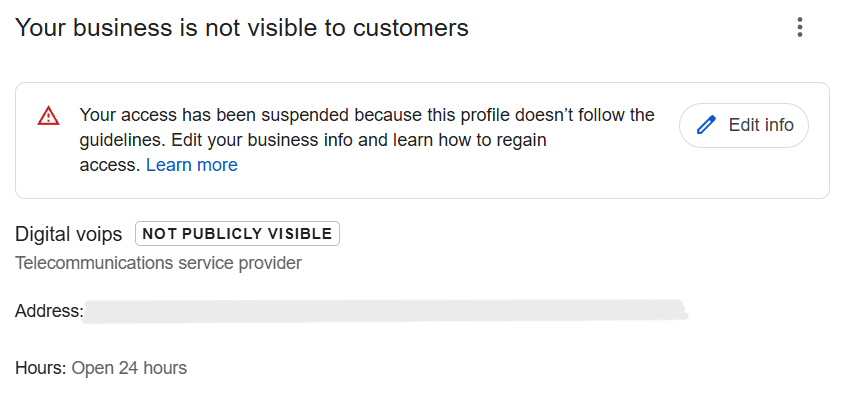
Google business suspension mistakes usually happen when a profile no longer meets Google’s trust or policy standards. Google’s goal is to keep Search and Maps accurate for users, so any signal that suggests misleading, fake, or inconsistent business information can trigger a suspension.
Suspensions occur through both automated and manual enforcement. Automated systems monitor profile edits, data patterns, and conflicts across the web. When these systems detect high-risk behavior, they can restrict or suspend a profile instantly. Manual enforcement happens when profiles are reviewed by human reviewers, often after user reports or repeated red flags.
Google applies strict policies consistently, even to legitimate businesses. Small violations, frequent edits, or mismatched information can add up and cause action. Understanding this helps set realistic expectations: compliance and stability matter more than speed or aggressive optimization.
Google detects suspension-worthy activity by continuously monitoring business profiles for behavior that conflicts with its guidelines. This enforcement logic focuses on protecting users from misleading or inaccurate business information.
Google uses algorithm-based checks to scan profiles for unusual patterns. These systems track edit frequency, sudden changes to sensitive fields, and conflicts with external data sources.
Behavioral red flags include repeated updates in a short time, keyword changes in the business name, or inconsistencies across the website and directories. When these patterns appear, Google may restrict or suspend the profile automatically.
Manual reviews often happen after user reports or when automated systems flag a profile multiple times. Customers, competitors, or local guides can report profiles they believe violate policies.
Reviewer audits involve human reviewers checking the profile against Google’s guidelines. If they find policy violations or misleading information, they can enforce suspensions even when automated systems did not act first.
Google business suspension mistakes often follow clear patterns. Most suspensions are not caused by a single action but by repeated issues that weaken Google’s trust in a profile.
These mistakes usually fall into a few main categories, such as unsafe profile edits, policy violations in business details, and inconsistencies across online platforms. Each category signals risk in a different way, but all affect how Google evaluates legitimacy.
Understanding these mistake categories first makes it easier to identify where problems begin. The sections that follow break down each mistake type in detail and explain how they lead to suspension.
Many suspensions happen because of unsafe profile edits that reduce Google’s trust in a business listing. These edits often look minor to business owners but signal manipulation or inconsistency to Google’s systems.

These unsafe profile edits weaken profile credibility over time. Managing edits carefully and following a structured approach helps prevent suspension before it happens.
Business name violations are one of the most common reasons profiles get suspended. Google has strict guidelines about how a business name should appear, and breaking these rules quickly reduces trust.
Google expects the legal or real-world business name, not a marketing version. The name should match what customers see on signage, official documents, and the website. Using taglines or promotional wording in the name violates policy.
Adding services or locations to the business name is another frequent mistake. Phrases like city names, service keywords, or offers may seem helpful for visibility, but Google treats them as manipulation and often flags the profile.
A mismatch with real-world branding also creates risk. If the name on the profile differs from signage, website headers, or invoices, Google may question legitimacy. Consistent, accurate naming across all platforms is essential to avoid suspension.
Address issues are among the most common GMB suspend reasons because location accuracy directly affects user trust and Maps results. Google closely reviews how and where a business operates.
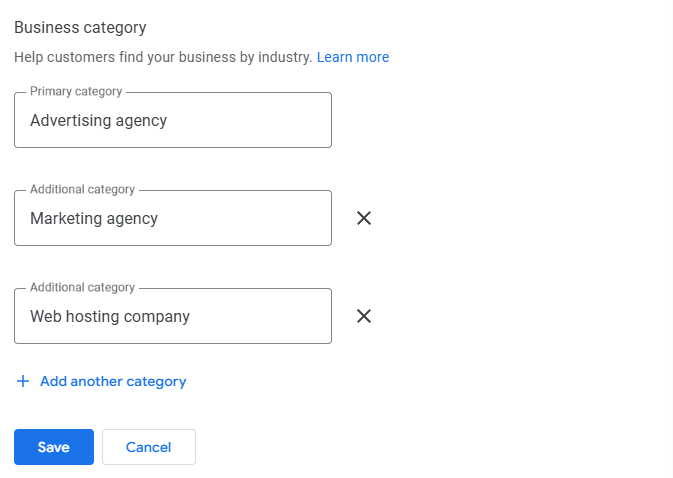
Category and service misrepresentation causes suspensions because it affects search relevance and user experience. Google expects profiles to reflect what a business actually does, not what it wants to rank for.
Choosing unrelated categories is a common mistake. Selecting categories only for visibility, rather than accuracy, misleads Google and often triggers review.
Listing services not actually offered also creates risk. When Google cross-checks profile services with website content or customer reports, mismatches reduce trust and can lead to suspension.
Overlapping business types add further confusion. Combining multiple unrelated services under one profile can violate guidelines, especially when separate businesses should have separate listings.
Google cross-checks Google Business Profiles against external signals to confirm accuracy. When information does not match across platforms, trust drops and suspension risk increases.
Website mismatches are a common issue. If the business name, address, services, or contact details on the website differ from the profile, Google may question legitimacy.
Citation inconsistencies across directories and listings also create problems. Conflicting business details signal unreliable information and can trigger review or suspension.
Phone and address conflicts further weaken trust. Using different phone numbers or addresses across platforms makes it difficult for Google to verify the business, increasing the likelihood of suspension.
Many businesses wonder why GMB suspended notices appear after what seem like minor updates. In most cases, suspension happens due to cumulative risk rather than a single edit.
Edit frequency plays a major role. Making several small changes within a short period can look suspicious to Google’s systems, even if each edit is technically allowed.
Timing issues also matter. Editing sensitive fields soon after verification, during ranking drops, or after reinstatement increases review risk because the profile is already under closer evaluation.
Over time, these actions cause trust score degradation. When trust decreases, Google may suspend the profile to protect search quality, even if no single change appears serious on its own.
Suspension prevention begins with keeping your Google Business Profile stable and consistent. Frequent changes, even when allowed, can weaken trust and increase review risk.
A stable profile sends clear signals to Google that the business is legitimate and reliable. This includes maintaining consistent business details, limiting edits to what is necessary, and spacing changes over time.
Focusing on suspension prevention means prioritizing accuracy and consistency before optimization. When stability comes first, profiles are far less likely to trigger enforcement actions or lose visibility.
If your Google Business Profile gets suspended, the first step is to pause all edits and review the suspension notice carefully. Google usually indicates the policy area involved, which helps identify what needs correction.
Next, fix any issues that caused the suspension. This may include correcting business name violations, address problems, category misuse, or inconsistencies between the profile, website, and listings. All information should reflect real-world operations and follow Google’s guidelines closely.
Once corrections are complete, submit a reinstatement request with accurate details and supporting evidence. In complex cases or repeated suspensions, using a professional GBP reinstatement service helps handle the process correctly, reduces errors, and improves the chances of successful restoration.
Google Business support can assist by explaining suspension reasons and outlining the basic steps required for reinstatement. They may guide you to relevant policies or confirm what information Google needs to review.
However, support has clear limitations. They often rely on automated systems and cannot override policy decisions or correct complex data conflicts. When suspensions involve multiple violations, repeated rejections, or high-risk edits, expert help matters. Professional Gmb support services understand how to prepare accurate reinstatement requests and avoid actions that could prolong suspension.
Use this checklist to reduce suspension risk and keep your Google Business Profile compliant and stable:
Google Business suspensions are easier to prevent than to fix. Most suspension cases come from avoidable mistakes that slowly reduce trust over time.
Managing a profile with a compliance-first approach helps protect visibility. Accurate information, minimal edits, and alignment with Google’s guidelines keep profiles stable and trusted.
Stability is a form of visibility protection. When a profile remains consistent and policy-compliant, it stays eligible for search and Maps exposure without the risk of sudden suspension.