

Many businesses choose their Google Business category once and never look at it again. At first, everything seems fine. The profile exists, the business appears on Maps sometimes, and there are no obvious errors. Over time, though, category mistakes quietly limit visibility without any warning signs.
Categories influence when and where a business appears in local search and Google Maps. They help Google decide which searches your business is relevant for. Google does not use categories to measure popularity or size. It uses them to understand intent. If the category does not clearly match what you offer, your business may not show up for the right searches.
This is why google business category optimization matters more than most people realize. Choosing the right category improves visibility safely, without shortcuts or risk. This guide explains how to choose categories correctly so your profile stays relevant, stable, and easy for Google to understand.
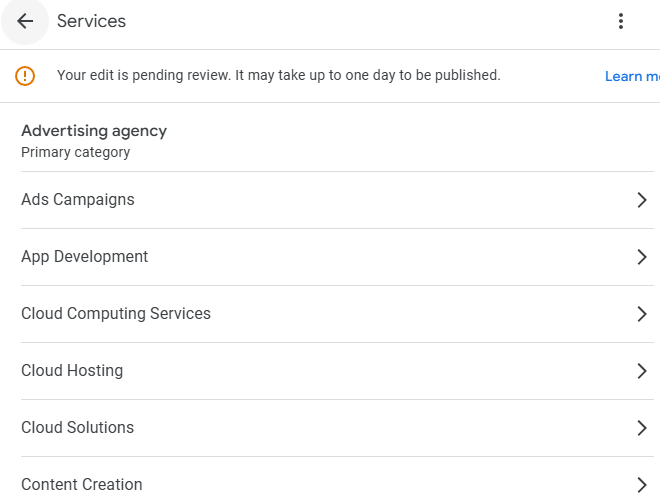
Google Business categories tell Google what your business is, not what you want to rank for. They act as a classification system that helps Google decide which searches your business is eligible to appear in. If the category is wrong or unclear, Google may simply skip your listing, even if everything else looks fine.
Categories are different from keywords. Keywords describe how people search, while categories define your business type. Adding keywords to descriptions or services cannot fix a weak category choice. Google relies on categories first to understand intent.
This is why categories control search eligibility. They determine whether your business can appear for certain local searches at all. The right category improves visibility in both Google Maps and local Search results, while the wrong one quietly blocks exposure.
Categories play a major role in broader profile optimization strategy, especially when businesses struggle with relevance.
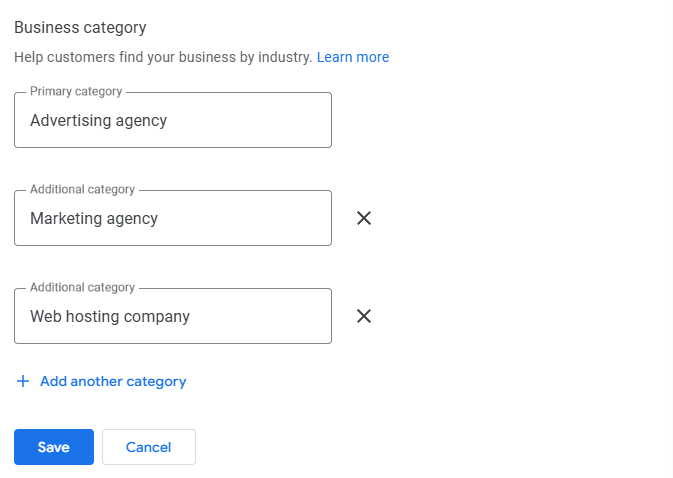
Choosing categories is not about adding as many options as possible. Google treats primary and secondary categories very differently, and misunderstanding this is one of the most common reasons profiles struggle.
The primary category defines search intent. It tells Google what your business mainly does and which searches you should be considered for first. This is why it carries the most ranking weight among all category choices.
A strong primary category is specific and closely matches your core service. A weak primary category is often too broad, vague, or only loosely related to what the business actually offers. When the primary category is unclear, Google has a harder time matching the business to relevant searches, even if other parts of the profile are complete.
Secondary categories help add context, but they do not override the primary category. They are useful when a business offers related services that support its main offering.
Secondary categories help when they are closely connected to the primary service. They hurt clarity when too many are added or when they describe services the business does not clearly provide. Google interprets supporting categories as additional context, not as equal ranking signals. Keeping them focused helps maintain relevance and trust.
Category mistakes are easy to make and hard to notice. Most of them do not cause sudden drops, but they quietly limit visibility over time. Understanding these mistakes helps protect your profile from unnecessary issues.
One common mistake is choosing categories based on competitors. Just because another business ranks well with a certain category does not mean it fits your services. Google evaluates each profile in context, and copying others often leads to weak relevance.
Another issue is picking the broadest category to get more reach. Broad categories usually reduce clarity. Google prefers specific categories that clearly match what a business actually does.
Adding unrelated categories is also risky. Extra categories that do not reflect real services confuse Google and users, which can reduce trust signals.
Changing categories too frequently creates instability. Constant edits make the profile look unreliable. Categories should change only when services genuinely change or when the original choice was incorrect.
Choosing the right category starts with understanding how customers think, not how businesses describe themselves. The goal is to make it easy for Google to connect your business with real searches.
Begin by thinking about how customers describe your service in simple terms. Most people do not use internal titles or industry jargon when they search. They use clear, common phrases that match their immediate need.
Avoid creative or branded language when choosing categories. A clever name may sound good internally, but it often hurts relevance. Clarity always performs better than creativity in categories because it removes guesswork for Google.
Categories must reflect what your business truly offers today. If a category suggests a service you do not clearly provide, Google may reduce trust in the profile.
Misalignment between categories and real services confuses both users and algorithms. This can lead to lower visibility or inconsistent appearances on Maps.
Google may suppress visibility when it detects that a category does not match real-world signals such as website content, reviews, or photos. Choosing categories that accurately reflect your actual services helps maintain trust and long-term stability.
Category choices directly affect how visible your business is on Google Maps. Categories help Google understand what your business is relevant for, which determines whether your listing is even considered for certain searches.
Relevance comes first. If your category clearly matches what someone is searching for, your business has a chance to appear. If it does not, proximity alone will not help. Even businesses that are physically close to the searcher can be skipped when their category does not align with search intent.
Categories also influence inclusion in the local pack. Google uses categories to filter which businesses qualify before it compares distance, reviews, and other signals. When the category is accurate, your business stays eligible for more relevant searches. When it is not, visibility drops quietly.
This is one reason category accuracy often leads to steady Maps ranking improvements over time.
Changing categories can help when done for the right reasons, but unnecessary changes often create instability. The goal is to update categories only when they no longer reflect the real business.
A category update makes sense when your services have changed in a meaningful way. If you no longer offer what your current category suggests, Google may struggle to match your profile to the right searches.
Another sign is a visibility drop that cannot be explained by reviews, accuracy, or competition. When everything else looks correct, an outdated or weak category may be limiting relevance.
If your profile no longer matches the business in the real world, categories should be reviewed. Google expects alignment between categories, website content, reviews, and photos.
Change only what needs to be corrected. Update the primary category if it is clearly wrong, but avoid changing multiple elements at the same time. Leave accurate categories alone.
After a category update, patience matters. Google needs time to reassess relevance and trust signals. Short-term fluctuations are normal.
Category changes should be rare. Reviewing categories quarterly is usually enough. Frequent changes without real business reasons often hurt stability more than they help.
Category changes do not produce instant results. When a category is updated, Google needs time to re-evaluate relevance, compare signals, and adjust visibility. This process happens gradually.
Short-term fluctuations are normal after a change. A business may appear more or less often for certain searches while Google reassesses the profile. These movements do not mean the change was a mistake.
Real improvement usually becomes noticeable over several weeks. Early signs include appearing for more relevant searches, better consistency in Maps results, and improved engagement. Stable rankings follow as Google confirms that the category accurately reflects the business.
Correcting categories often improves relevance and visibility, but it does not solve every problem. Some businesses update their categories, wait patiently, and still see limited or inconsistent results. When this happens, the issue is usually broader than categories alone.
Other profile elements may be holding performance back, such as weak service alignment, inconsistent business information, suppressed fields, or low engagement signals. Categories work best when they are supported by a complete and healthy profile. Fixing one area without addressing the rest can limit progress.
For businesses that want help aligning categories with overall profile performance, working with a professional GBP Optimization Service can help identify gaps and apply changes safely.
At this stage, the focus shifts from individual fixes to improving how the entire profile works together.
Long-term category stability is built through patience and consistency. Categories should not be treated as a quick-fix lever, but as a foundation that supports relevance over time.
Review your categories quarterly, not weekly. Frequent checks help ensure accuracy without creating unnecessary changes. Weekly edits often introduce instability and make it harder for Google to trust the profile.
Always align categories with real-world changes. If services expand, narrow, or shift, update categories carefully to reflect what the business actually offers. Avoid making changes based on short-term ranking movement or competitor behavior.
Reactive edits usually do more harm than good. Stability builds trust because it signals reliability. Profiles that stay accurate and consistent over time tend to earn stronger, more predictable visibility.
Google Business categories define relevance, not reach. They help Google understand what your business actually does and when it should appear, not how popular or large it is.
The primary category carries the most weight and sets the foundation for all other relevance signals. When it is accurate and focused, it becomes easier for Google to match your business with the right searches.
Small, accurate changes outperform frequent edits. Updating categories only when something is truly incorrect or outdated protects stability and builds trust over time.
Correct categories support long-term visibility by keeping your profile clear, consistent, and reliable. Take time to review your current Google Business category using the principles outlined in this guide and make changes with purpose, not urgency.